TRY FREE!
Try ADL Today! ADL is free and available in public preview preview
The quickest path is to install a starter solution from the Marketplace, run the generator, and see real output land in your repository within minutes.
Roelant Vos 4 min read
Versioning in conventional modeling tools is reliably one of three things: slow, complex, or prone to conflicts - and usually all three. The metadata sits in the tool’s database repository, the tool often is the only thing that can reliably read it, and the way you interact with history follows from that constraint. To track changes you often wait on a check-in dialog. To compare versions you open a proprietary viewer proved by the tool. To collaborate you negotiate around object locks. The version system is whatever the tool decided to remember, executed at whatever speed its server can manage, with merge conflicts handled inside a vendor UI that can be a bit of an acquired taste.
ADL provides an alternative to this, one that removes the constraints that a proprietary versioning approach has. Using an open and interoperable format in JSON, any and all metadata changes can simply be managed through Git.
Your design metadata in ADL is managed as a set of plain JSON files in your own local environment. Open them in any editor, and diff them in your preferred tool.
There is no central database. No proprietary format. No hidden state. The metadata is just files - and Git already knows how to version files very well.
So ADL’s versioning is not a feature it needs to implement. Instead, it is a property of the architecture. Your design metadata is in it from the start. You do not need configure it. It is just where things are.
Handling this well, without friction, takes more than simply creating an app that ‘writes JSON’. The app makes deliberate choices so that Git sees clean, reviewable diffs. For example:
Customer Data Object lives in Metadata/DataObjects/Customer.json. Rename it and Git sees a file rename. Add a column and Git sees a single-line diff in that one file. Delete it and Git sees one file removed.main, you are working on main. If you checked out feature/new-pii-rules first, you are working there. ADL has no opinion. Branching, merging, cherry-picking — that is Git’s domain.The folder you point ADL at is the folder git tracks — nothing more.
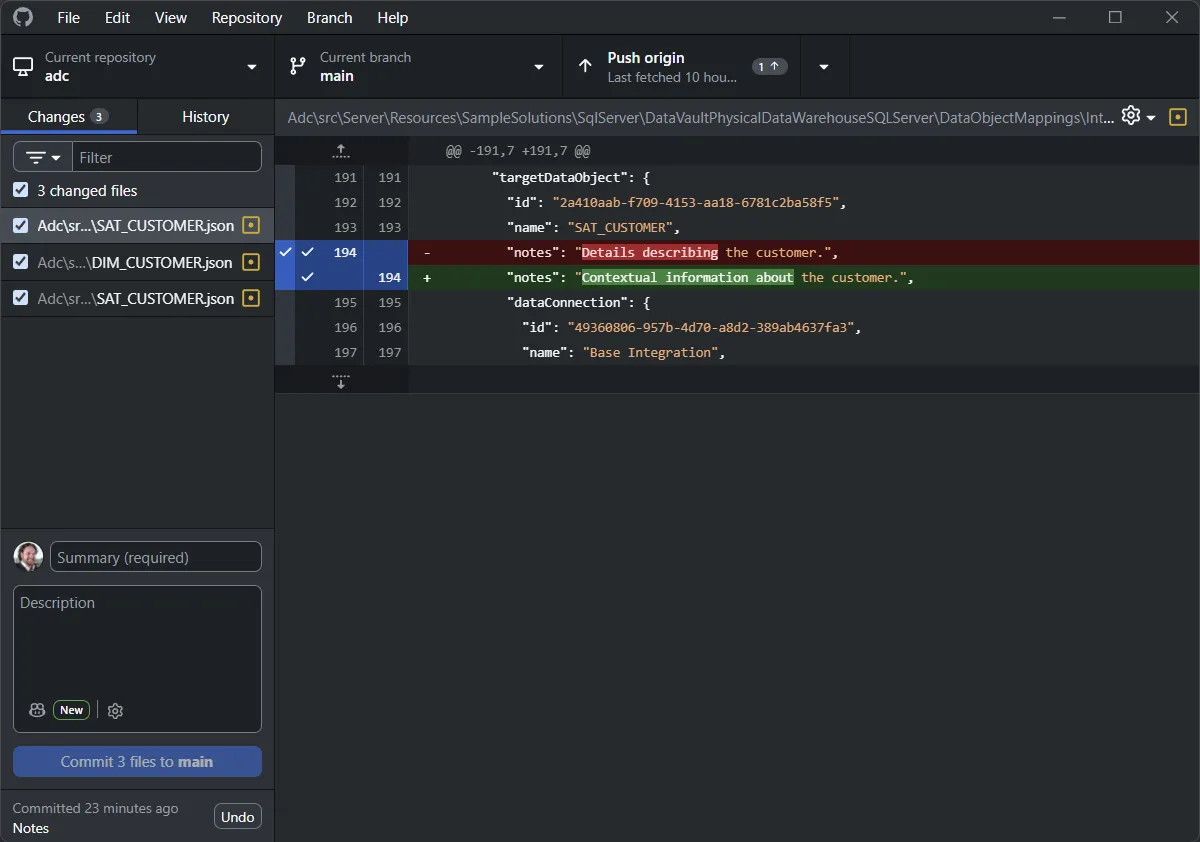
Below is what a typical metadata change can look like in a typical Git tool. Three JSON files affected, with the actual edit - a Customer notes-field update - visible as a one-line diff.
Once the metadata is in Git, the workflows your team is already used to starts working on the design metadata too:
NOT NULL? Right-click in your editor. The commit that made it so, the message that explained why, and the PR it came from are already there.Design metadata is the long-lived artifact of any data solution; the technology underneath changes, but the design, the concepts, and the metadata remain.
ADL’s job is to be a good metadata editor that writes clean files. Git’s job is to remember what changed. Your review tooling’s job is to surface diffs. Each tool does the part it is good at, and the result is that your design metadata gets treated like every other artifact in your codebase.
The quickest path is to install a starter solution from the Marketplace, run the generator, and see real output land in your repository within minutes.